Yesterday (22 Feb, 2014), Apple pushed a rather spooky security update for iOS that suggested that something was horribly wrong with SSL/TLS in iOS but gave no details. Since the answer is at the top of the Hacker News thread, I guess the cat’s out of the bag already and we’re into the misinformation-quashing stage now.
more
Additional: goto fail and embedded C Compilers
With Keynotopia Mockup Bundle, you can sketch user interfaces using Apple Keynote.
When your mockups look like simple hand-drawn screens, it’s easier to get feedback on layout and structure, without getting distracted by the detail.
Keynote mockups are better than hand-drawn sketches because you can iterate on them and modify them without having to redraw them.

An at-a-glance view of your daily events and tasks.
With Today you can keep track of what’s on your plate for any given day without keeping iCal open all the time. Today syncs with iCal and your life’s agenda so daily events & tasks are always available via one, convenient little interface.
See only what’s important
iCal is great for keeping track of every aspect of your life. Whether you use Delicious Library to keep track of who you loaned DVDs to or subscribe to your favorite baseball team’s schedule, iCal can get a bit cluttered. Today allows you to filter what calendars’ events show up in Today.
Only show your school schedule, meetings or birthdays. It’s all up to you.
Not free.
Homepage
Anxiety is a super-lightweight To-do list application for Mac OS X Leopard that synchronizes with iCal and Mail. Its aim is to provide a streamlined, easily accessible interface to add and check off your tasks, while remaining poised to melt into the background at a moments notice.

Free
Reader Notifier, discretely residing in your menubar, lets you know when Google Reader has found new items for you to read.

homepage
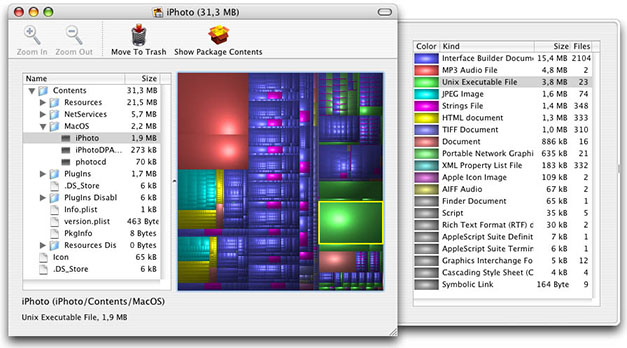
Disk Inventory X is a disk usage utility for Mac OS X 10.3 (and later). It shows the sizes of files and folders in a special graphical way called “treemaps”.
If you’ve ever wondered where all your disk space has gone, Disk Inventory X will help you to answer this question.
homepage
A firewall protects your computer against unwanted guests from the Internet. But who protects your private data from being sent out? Little Snitch does!
homepage